Your requests, appointments and finances in one dashboard.
With a free account you can find a pro, compare quotes, set reminders and track your budget. Every feature works on the web, in five languages.
You type, the assistant plans
The assistant understands everyday language: it works out whether you need a service, insurance, a loan or a reminder, and picks out the time, location and priority. You check, edit and confirm.
- Natural language in Turkish, English, German and Arabic
- Exact-time reminders: "tomorrow at 9", "in 2 hours"
- Recurring reminders: "every month on the 5th", "every two weeks"
- Shows suitable service providers and their free slots
- Suggests nearby districts, a wider area or another time, or passes your request to our expert team
Service, insurance and loan requests
Create a request for a plumber, electrician, painter, cleaner, air conditioning, home appliances, moving, a dentist, a hairdresser and more. Insurance (DASK earthquake insurance, comprehensive car, compulsory traffic, health, home…) and loan requests (personal, mortgage, vehicle…) live in the same place.
- Up to 6 photos per request; location and device data are stripped on the server
- Timeline: created, assigned, accepted, started, completed
- Pick one of your saved addresses with a single tap
- Instant notifications when the status changes
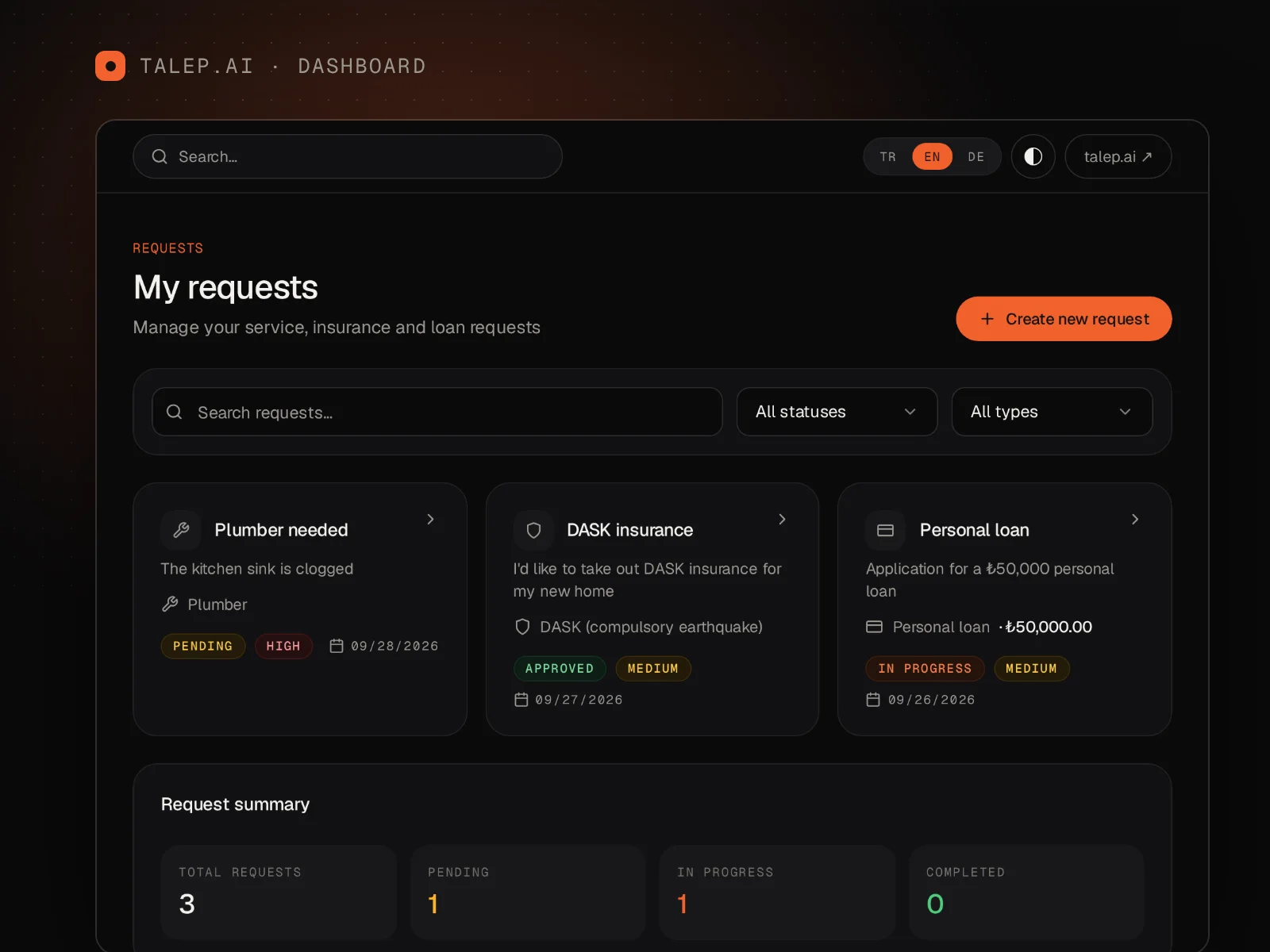
Request directly from a pro you know
Providers you've worked with or connected to through an invite link stay on your list; with "Request from this pro" you send your request straight to them, without matching. If your pro proposes a maintenance contract for regular work such as a boiler, air conditioner or garden, you approve it and the visit requests are created ahead of each date.
- "Request a quote" on the pro's mini website (talep.ai/u/…)
- Approve, pause or cancel a maintenance contract
- Choose your own address for the visits
Compare quotes, approve them in the app
The provider's quote arrives itemized: labour, materials and VAT are shown separately. If there are several options (Economy, Standard, Premium), you pick one and accept it; if a site visit is needed, you choose one of the proposed times.
- Line-by-line amounts with VAT shown
- Economy / Standard / Premium options
- Site visit proposals with time selection
- Validity period, revision history and a printable quote
Real-time messaging with read receipts
Chat instantly with the service provider assigned to your request. You see when a message is sent, delivered and read, and you know when the other side is typing.
- Instant delivery with sent / delivered / read ticks
- New message notifications (the message text is not shown in the notification)
- The conversation stays open for 7 days after the job is completed
Follow your pro live
When the provider taps "I'm on my way" you get a notification, and your request page shows their live location on a map, the distance and an approximate arrival time. On arrival you get a "Your pro has arrived" notice. The location is shown only while the trip is active and only to you; it is deleted after 24 hours.
- Live location and ≈ arrival time
- Arrival detected automatically within 100 metres
- Location can't be viewed after the trip ends
Report, block
You can report an offensive message, or the whole conversation, with a reason, and block the person. Reports are reviewed by our team within 24 hours; the reported person is not told. Blocking closes all conversations between the two of you but doesn't cancel the job, and a provider you've blocked won't be suggested to you again.
- Reasons: spam, harassment, hate speech, sexual content, scam, threat, personal data
- You can lift a block at any time
- Community guidelines are public
Ratings and reviews
When the job is done you give 1–5 stars and add short tags (punctual, tidy, fair price, communication, quality) and a comment. You can edit your review within 7 days; the service provider can reply publicly once.
- 1–5 stars, tags and a comment
- Your name appears only as your first name and last initial
- Public reply from the provider
Reminders that arrive on time, in your language
Reminders arrive as notifications at the time you choose; appointments are reminded 24 hours and 2 hours in advance. Notifications are written in your interface language.
- Exact-time and recurring reminders (daily, weekly, monthly, yearly)
- Reminders 24 hours and 2 hours before an appointment
- Appointment notifications between 22:00 and 08:00 are held until morning
- In-app notifications, plus email if you prefer
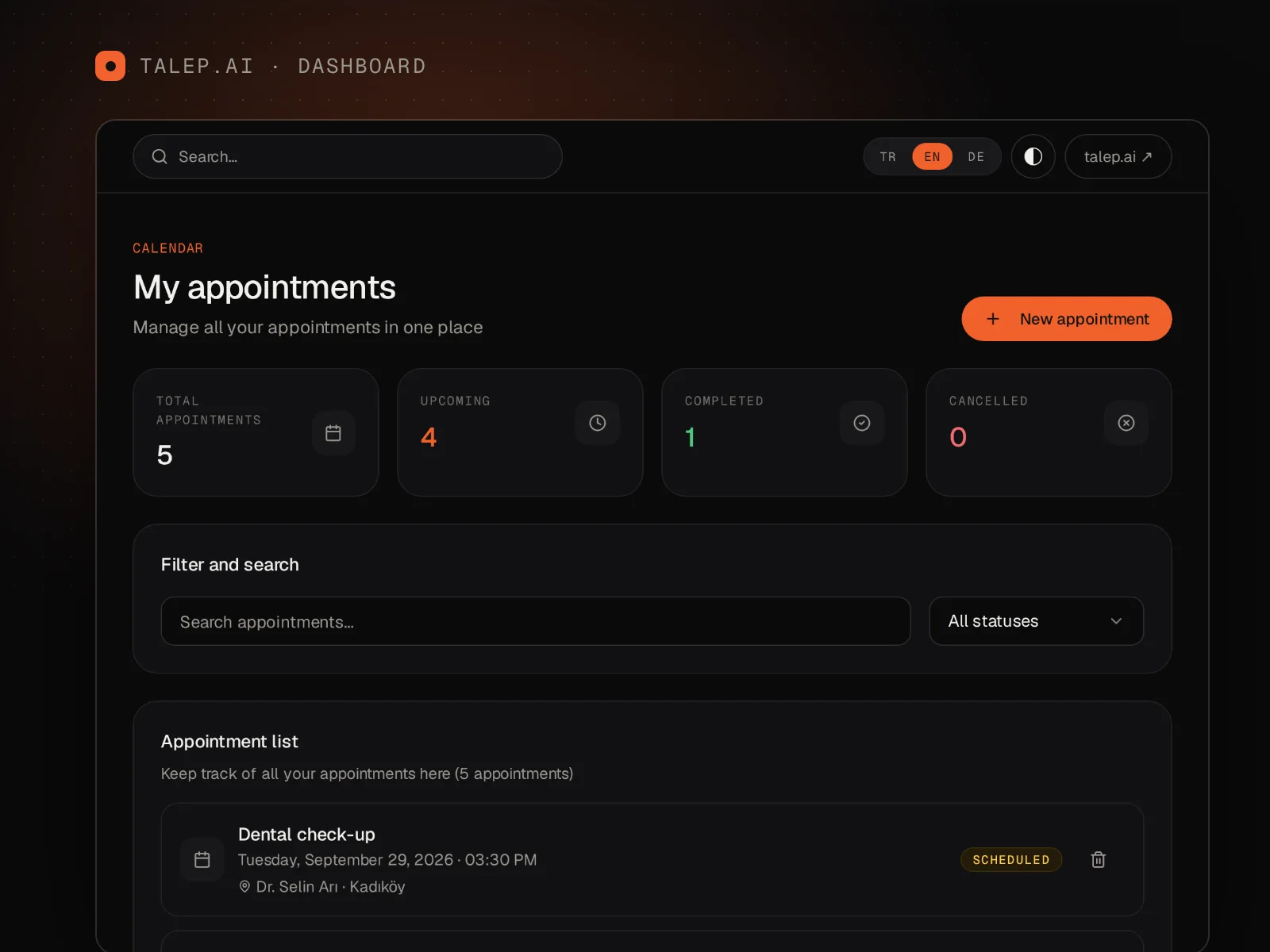
In your Google, Apple and Outlook calendar
Add the personal calendar link from your dashboard to Google Calendar, Apple Calendar or Outlook as a subscription; your appointments, reminders and dated requests appear in your own calendar, and your calendar app refreshes the link at regular intervals. Addresses appear as district and city only.
- ICS subscription (webcal)
- Renew or switch off the link
- Phone numbers are never written to the calendar
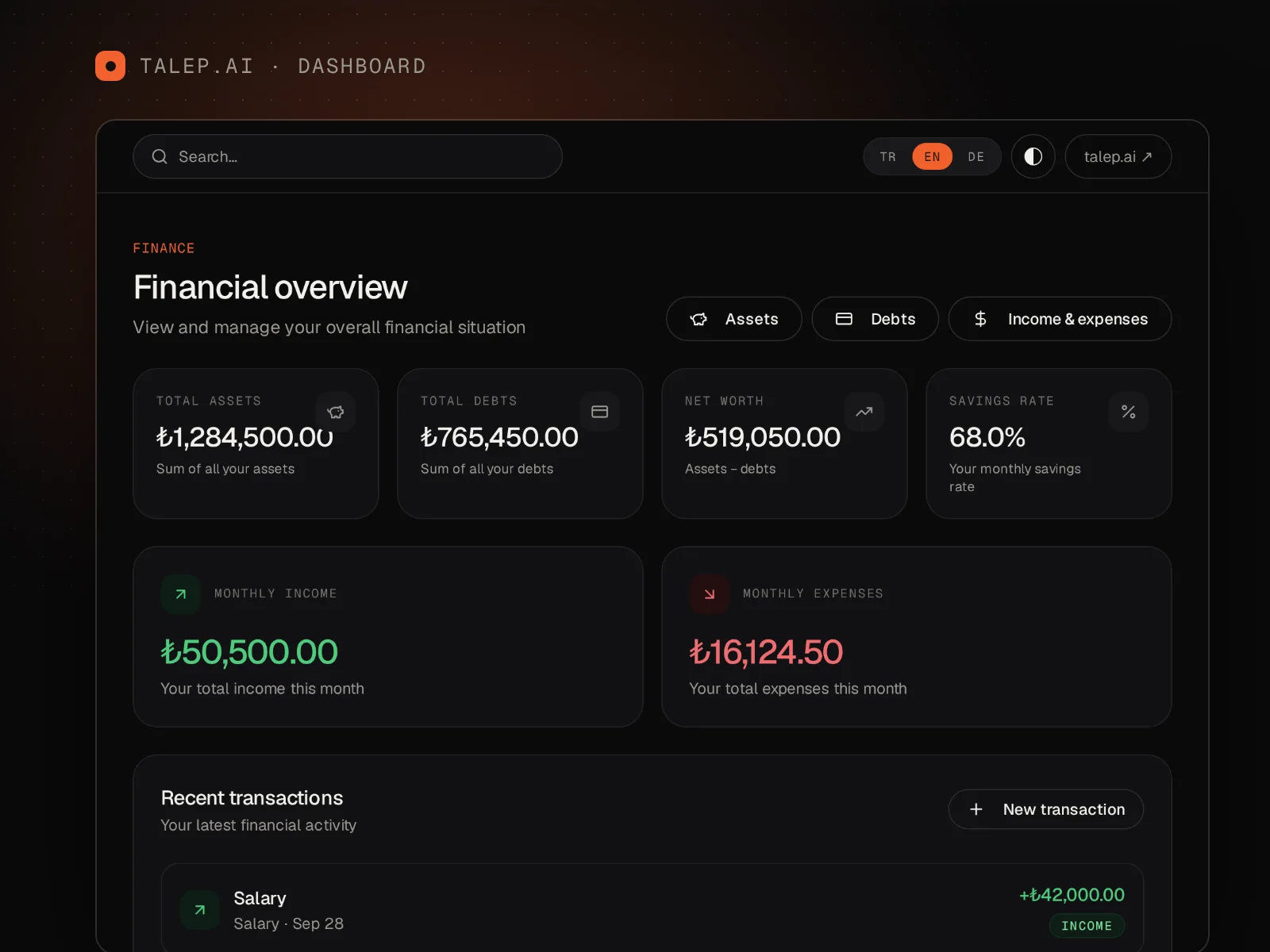
Income, expenses, budgets and recurring payments
Record your income and expenses, sort them into categories and set budgets. You get an alert when you reach 80% and 100% of a budget. Recurring payments such as rent, building fees and bills appear in a single list, where you mark them as "paid".
- Budget alerts at 80% and 100%
- Recurring payments: monthly total, upcoming and overdue payments
- Bank statement CSV import with automatic categories and duplicate detection
- Assets, debts, reports and analytics
Policies, warranties and invoices, reminded before they expire
Keep your insurance policies, warranties, invoices, vehicle registration and contracts together with their files. You're reminded 30, 7 and 1 day before the expiry date (adjustable), and for insurance you can request a renewal quote in one tap.
- DASK earthquake, kasko, traffic, home, health, life and travel insurance
- Up to 5 photos or PDFs per document
- Policy numbers and notes are stored encrypted
- Nobody but you can see your files
Medication times and measurements, with your consent
The Health section opens only with your explicit consent. Set medication reminders, mark doses as "taken", see your weekly adherence, and record blood pressure, glucose and weight as well as your vaccination and check-up calendar. No medical interpretation or advice is given.
- Reminder at dose time; the medication name never appears in the notification
- Adherence for this week and last week
- Measurements are recorded, not interpreted
- Medication names, doses and values are encrypted
Plan together at home
Create a household with your partner, flatmate or family. Share the reminders, appointments, requests and recurring payments you choose, and keep a shared shopping and to-do list. Due dates of shared bills are reminded to every member.
- Up to 8 members; adults (18+) only
- Only what you explicitly share is visible
- Personal finance, Documents and health data are never shared
Invite friends, we say thanks
Share your personal invite link. There's no monetary reward for user invites; you earn a thank-you badge. If you're a service provider, you earn one free month when a provider you invited pays their first statement (up to 3 per month).
- Invite with your personal link
- Providers: 1 free month, deducted from the next statement
Your addresses, on the map
Save your home, work and other addresses, pin the location on the map and choose a default address. No need to type an address when you create a request.
- Up to 20 saved addresses
- Pin locations on the map (OpenStreetMap)
- Default address and one-tap selection
Your account, under your control
Protect your account with two-step verification, recovery codes and a list of active sessions. Verify your phone number with an SMS code; download your data or delete your account under KVKK.
- Two-step verification with an authenticator app and 10 recovery codes
- Session list; sign out of individual sessions or all other devices
- Phone verification (SMS code)
- Download my data (JSON) and account deletion
Five languages, light and dark themes
The interface is available in Turkish, English, German, Arabic (right-to-left) and Albanian, and you can choose a light or dark theme. The dashboard also works fully in your phone's browser. iOS and Android apps are coming soon.
- Türkçe, English, Deutsch, العربية, Shqip
- Light / dark theme
- Mobile-friendly web dashboard; mobile apps coming soon
Does talep.ai cost anything for users?
No. For individual users, creating requests, getting quotes, messaging and using the reminder and finance tools are free. You only pay the service provider for the service you receive, based on the quote you accept.
How do I find a pro on talep.ai?
Type what you need to the assistant (e.g. "I need a plumber in Kadıköy tomorrow evening") or fill in the request form. The assistant shows suitable providers serving your area and their free slots; you pick one and confirm. Our team can also assign your request to a suitable provider.
How do I compare and approve quotes?
The provider's quote arrives itemized on your request page, with VAT shown separately. If there are several options (Economy, Standard, Premium), you pick one and tap "Accept". For a site visit proposal, you choose a time that suits you. Declining a quote does not cancel the job.
How do I see my pro's location, and how long is it kept?
When the service provider taps "I'm on my way" you get a notification, and your request page shows their live location and approximate arrival time. The location is shown only while the trip is active and only to you; after the trip it can't be viewed, and all location records are deleted after 24 hours.
What can I add to Documents, and will I be reminded?
You can add insurance policies (DASK, kasko, traffic, home, health, life, travel), warranties, invoices, vehicle registration and contracts, with up to 5 photos or PDFs per document. You're reminded at 09:00 before the expiry date (30, 7 and 1 day by default), and for insurance you can request a renewal quote in one tap.
Is the Health section secure, and does it give medical advice?
The Health section opens only with your explicit consent. Medication names, doses, measurement values and notes are stored encrypted and shown only to you; reminder notifications never contain the medication name. The section gives no medical interpretation or advice and doesn't evaluate measurements; consult your doctor for health decisions.
What is Household and who can join?
Household is a space where up to 8 people aged 18 or over share reminders, appointments, requests and recurring payments and keep a shared shopping list. Only what you explicitly share is visible; personal finance, Documents and health data are never shared.
Can I connect talep.ai to my Google, Apple or Outlook calendar?
Yes. Add the calendar subscription link from your dashboard to Google Calendar (by URL), Apple Calendar or Outlook, and your appointments and jobs appear in your own calendar. Addresses appear as district and city only; you can renew or switch off the link at any time. Service providers can also import busy times from their external calendars.
How do I report an offensive message or block someone?
In Messages you can report a single message or the whole conversation with a reason, or block the person. Reports are reviewed by our team within 24 hours; the reported person is not told. Blocking closes all conversations between you in both directions but doesn't cancel the job. Guidelines: panel.talep.ai/topluluk-kurallari.
Create your account and write your first request.
Every feature is free for individual users; no credit card required.